Showing posts with label SharePoint. Show all posts

Tuesday, November 6, 2012

WebPart Maintenance Page in SharePoint

Hi All,

WebPart Maintenance page is used to close Web Parts on your page, restore defaults to Web Parts, or delete Web Parts from your page.

To go to this page, just type contents=1 in query string.

Example: http://sp2007/default.aspx?contents=1

WebPart Maintenance Page screen:


We can close, delete the webparts by just selecting them using checkbox.

Thank you !

Wednesday, September 5, 2012

Cannot make a cache safe URL for "styles/~/SampleProject/StyleSheet.css", file not found. Please verify that the file exists under the layouts directory.

Hi All,

While trying to register a CSS file in SharePoint using CSSRegistration class as:

// Register CSS File
CssRegistration.Register("~/_layouts/SampleProject/StyleSheet.css");

We got the following error:

"Cannot make a cache safe URL for "styles/~/SampleProject/StyleSheet.css", file not found. Please verify that the file exists under the layouts directory".


One of the benefits of using SharePoint:CSSRegistration is that it prevents multiple loading of same CSS file. For Example, if we try to register a CSS file multiple times as:


// Register CSS File
 CssRegistration.Register("/_layouts/SampleProject/StyleSheet.css");
 CssRegistration.Register("/_layouts/SampleProject/StyleSheet.css");
 CssRegistration.Register("/_layouts/SampleProject/StyleSheet.css");
 CssRegistration.Register("/_layouts/SampleProject/StyleSheet.css");

The final rendered Page will have only one instance of this style sheet.

Ok. Coming back to the problem, the Resolution is to remove ~ in the URL. Hence, the correct statement would be:


// Register CSS File
 CssRegistration.Register("/_layouts/SampleProject/StyleSheet.css");

Here is a good source to know more about SharePoint:CSSRegistration:
http://tommdaly.wordpress.com/2012/05/02/sharepoint-cssregistration-or-link/

Thanks !

Sunday, April 1, 2012

Error occurred in deployment step 'Retract Solution': A timeout has occurred while invoking commands in SharePoint host process

Hi All,

We got this error when trying to deploy the SharePoint solution using Visual Studio 2010.

Error occurred in deployment step 'Retract Solution': A timeout has occurred while invoking commands in SharePoint host process


To resolve this error, make sure the following checks are made:

1. Make sure that Application Pool corresponding to the site on which deployment made is up and running.

2. Restart the Visual Studio and reset the IIS if necessary.

We did the above steps and issue got resolved.

Thanks.

Friday, March 23, 2012

Claims Based Authentication in SharePoint 2010 using SQL Server Provider


Hi All,

Here's is the best resource to consider when you wanted to set up Claims Based Authentication for SharePoint 2010 using SQL Server Provider.

You can easily setup the Forms Based SharePoint site by following the above post by Kirk Evans[MSFT].

Here are some of the issues I faced during the setup.

Issue 1: Users created in ASPNETDB created using aspnet_regsql.exe are not showing up in SharePoint PeoplePicker.

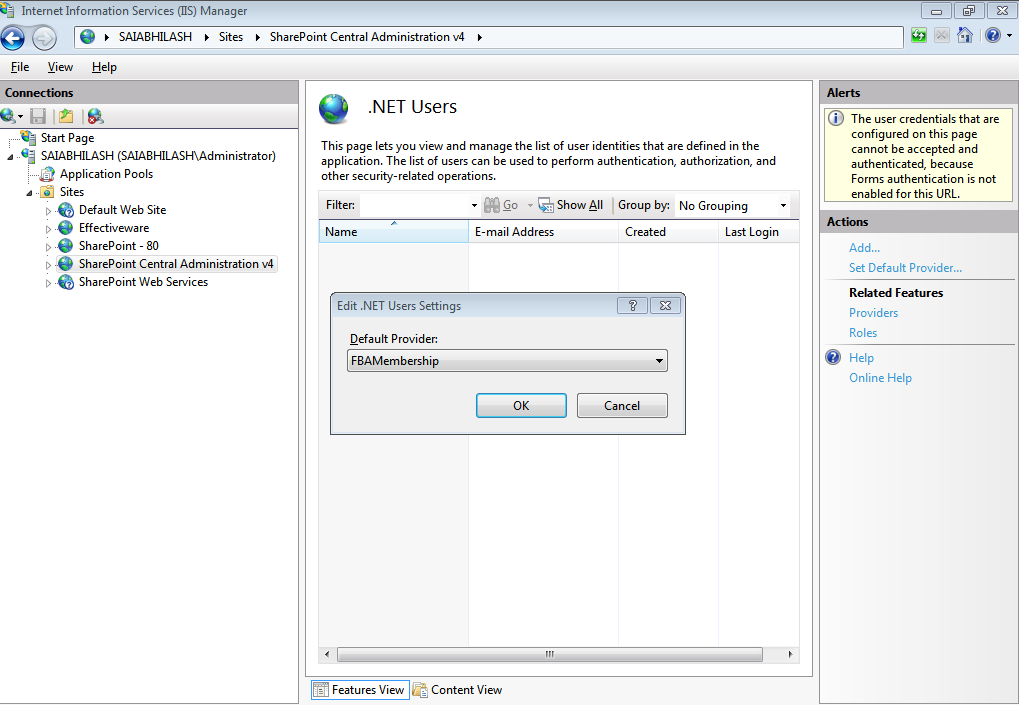
Solution: This is the most common issue most of the users face. When we are adding the users to ASPNETDB by using IIS Manager (IIS Manager -> Central Admin Site -> .Net Users), the default provider is set to our custom provider as shown below. Here FBAMembership is my custom Membership provider.

Just revert the Membership and Role Provider to their default. This is done by clicking the Roles -> Set Default Provider. Similary, click Providers -> Set Default Provider.

Once this is done, i was able to resolve the users present in ASPNETDB in PeoplePicker as shown below.

The users present in ASPNETDB (Shown in ASP.NET WebSite Administration Tool)

Users shown after searching in Address Book:


Issue 2:The Forms User is unable to login to SharePoint Site though resolved in People Picker
As shown in the above picture, the forms user (fbaadmin) is the site collection administrator for the site but when tried to login to SharePoint using correct credentials, i was unable to login as shown below:


Obviously, this is an issue with Secure Store Token Service (STS) and below is the error message i got in Event Viewer:
An exception occurred when trying to issue security token: The security token username and password could not be validated
For this, i had to reconfigure the Membership and Role providers for STS and IISReset. Thats it. after that I was able to login to the SharePoint site.

Happy Coding...!!!

Thursday, March 1, 2012

Custom Context Menu in SharePoint 2010

Hi All,

We know that sharepoint by default provides context menu option for "Title" field. What if we require a content menu for some other column other than "Title"?

In my case, I need to provide a context menu option for a thumb nail image.

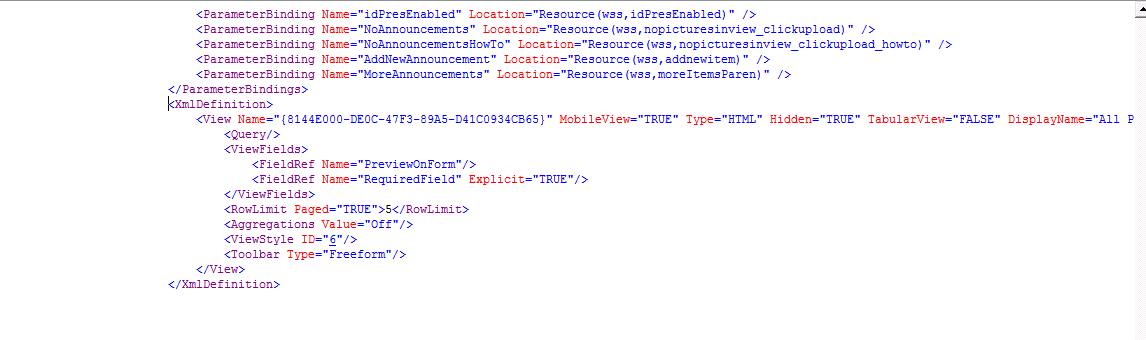
The ViewFields section of picture library looks like this.


Here, I need the content menu for the viewfield "FieldRef Name='PreviewOnForm'/>".

To achieve this functionality, just add the below attributes after Name='PreviewOnForm'

"LinkToItem="TRUE" LinkToItemAllowed="Required" ListItemMenu="TRUE"" as shown below below.


This makes sure that we get a context menu when clicked on the 'PreviewOnForm' field as shown below


Cheers !

Thursday, February 16, 2012

DataView RowFilter

Hi All,

Here is the best resource to learn about RowFilter in DataView.

Also have a look at the way to escape special characters to prevent SQL Injection problems.

Cheers !

Sunday, January 22, 2012

Sending HTML Formatted Emails in SharePoint Designer Workflows

Hi All,

Did you ever faced the problem of emails sent using SPD 2010 showing html tags ?

This is the most common error if you are trying to add your own html tags in workflow's send email activity.

The workaround for this problem is:

1. Add Send Email activity in SPD 2010

2. Select the Send Email activity and click on Advanced Properties as shown below


3. Once you click on Advanced Properties, you will get a popup like this:


4. Here, as you see, you can add parameters like To Address, CC Address, BCC Address etc.

5. Select Body and Click on the button to the left of fx and insert your custom Html there and Publish the workflow

6. Now, the html tags will not be rendered in emails received !

Cheers

Saturday, January 21, 2012

Restore a Site Collection in SharePoint 2010

Hello All,

Here's is the best resource to restore a deleted site collection in SharePoint 2010 using Powershell.

Cheers!

Monday, January 2, 2012

Download a File from FBA enabled SharePoint Site Programatically using WebClient

Hello All,

We recently had a requirement to download an image from a Forms Based SharePoint site programatically but we always got 403 error (Forbidden) when trying to download using WebClient.DownloadData method.

Fortunately, after some googling, we found this great post which helped me in resolving the problem.

On a high level, this approach uses the SharePoint's Authentication.asmx web service to hit the site using the credentials.

Hope this helps. Have a great year ahead....!

Thursday, December 22, 2011

Unable to get List data present in Claims Based Web Application

Hi All,

Recently we faced the problem of not able to pull data that is present in Windows Authenticated Web Application from a Claims Based Web Application. These two web apps are on same server.

Tried all possible ways like LINQ to SharePoint, Client Object Model, 2007 lists.asmx etc. but no luck

Finally, we have added a registry key called "DisableLoopBackCheck" and set its value to 1.

More information on this can be found here

Cheers !

Tuesday, December 20, 2011

Read Credentials from Secure Store Service Programatically in SharePoint 2010

Hello,

If you want to read the credentials set in secure store service programatically, then the below code is helpful.

using System;
using System.Collections.Generic;
using System.Linq;
using System.Text;
using Microsoft.SharePoint;
using System.Runtime.InteropServices;
using System.Security;
using Microsoft.BusinessData.Infrastructure.SecureStore;
using Microsoft.Office.SecureStoreService.Server;


namespace ReadSecureStoreCredentials
{
    public static class SecureStoreUtils
    {
        public static Dictionary<string, string> GetCredentials(string applicationID)
        {
            var credentialMap = new Dictionary<string, string>();
            SPSecurity.RunWithElevatedPrivileges(delegate()
            {
                SPSite site = SPContext.Current.Site;
                SPServiceContext serviceContext = SPServiceContext.GetContext(site);
                var secureStoreProvider = new SecureStoreProvider { Context = serviceContext };
                using (var credentials = secureStoreProvider.GetCredentials(applicationID))
                {
                    var fields = secureStoreProvider.GetTargetApplicationFields(applicationID);
                    for (var i = 0; i < fields.Count; i++)
                    {
                        var field = fields[i];
                        var credential = credentials[i];
                        var decryptedCredential = ToClrString(credential.Credential);

                        credentialMap.Add(field.Name, decryptedCredential);
                    }
                }
            });
            return credentialMap;
        }

        public static string ToClrString(this SecureString secureString)
        {
            var ptr = Marshal.SecureStringToBSTR(secureString);

            try
            {
                return Marshal.PtrToStringBSTR(ptr);
            }
            finally
            {
                Marshal.FreeBSTR(ptr);
            }
        }
    }
}


Make sure you have added the following dll's

1. Microsoft.Office.SecureStoreService.dll located at C:\Windows\assembly\GAC_MSIL\Microsoft.Office.SecureStoreService\14.0.0.0__71e9bce111e9429c\Microsoft.Office.SecureStoreService.dll and

2. Microsoft.BusinessData.dll located at C:\Program Files\Common Files\Microsoft Shared\Web Server Extensions\14\ISAPI\Microsoft.BusinessData.dll

And here is how you make use of the above code to read credentials from secure store service

Dictionary<string, string> SSCredentials = SecureStoreUtils.GetCredentials("SecureStoreId");
string strDU = SSCredentials.ElementAt(0).Value;
int SlashPos = strDU.IndexOf('\\');
this.strDomainName = strDU.Substring(0, SlashPos);
this.strUserName = strDU.Substring(SlashPos + 1, strDU.Length - this.strDomainName.Length - 1);
this.strPassword = SSCredentials.ElementAt(1).Value;


Bye for now :)

Saturday, December 10, 2011

Error occurred in deployment step 'Recycle IIS Application Pool': A timeout has occurred while invoking commands in SharePoint host process.

Hello,

We got the below error while trying to deploy SharePoint solution

Error occurred in deployment step 'Recycle IIS Application Pool': A timeout has occurred while invoking commands in SharePoint host process.

Thr possible reasons for this error as per MSDN forums are:

1. Less System Resources, possible <6 GB of RAM. (Recommended RAM for SP 2010 is >=6GB)

2. Application Pools might be stopped.

In my case, both these possibilities doesnot apply.

The solution to eliminate this error is:

Increase the Shutdown Time Limit and Startup Time Limit under Application Pool -> Advanced Settings.

This resolved the above error:)

Hidden SharePoint List - User Information

Hello Again,

There is a hidden list in SharePoint which stores the User Details like Name, Email, Login Name etc.

We can access this list using the URL:

http://WebApplicationName/_catalogs/users/simple.aspx

Here, when ever a new user is added to the sharepoint site, firstly that user will be added to this list. Hence, we can consider this list as a resource of all users present in the site.

We can acess this list through object model as:

SPList hiddenUserList = SPContext.Current.Web.SiteUserInfoList; 

Note that this list contains the users which are deleted from Active Directory too. Hence, whenever we delete a user from SharePoint site, its actually a soft delete and that user details still exist in this hidden list.

SharePoint Rocks !!!

Get User Details by ID in SharePoint 2010

Hello,

If you want to get the user details like Name, Email and other details of SharePoint user based on ID (Example: 12;domain\username), then the below code will be useful

SPContext.Current.Web.AllUsers.GetById(12).Email

Thursday, December 1, 2011

The specified path, file name, or both are too long. The fully qualified file name must be less than 260 characters.

Hello Again !

We usually get this common error when trying to deploy a package containing files of length greater than 260 characters. VS 2010 showed this error in feature.

The specified path, file name, or both are too long. The fully qualified file name must be less than 260 characters.

At first glance, the obvious solution which we feel is to reduce the file names in the solution. I tried the following approaches:

1. Reduced the file names in my solution especially the SharePoint Mapped Layouts Folder.
2. Changed the VS 2010 Project directory from C:\Users\saiabhilash\Documents\Visual Studio 2010\Projects to C:\MyProjects but got the same error !

OK! The resolution to this problem is to change the Deployment Path for the Feature. Double Click on the Feature and click F4 by selecting the feature. By Default, the Deployment Path for a features looks like this

"$SharePoint.Project.FileNameWithoutExtension$_$SharePoint.Feature.FileNameWithoutExtension$"

We have deleted the First Portion of this string and modified the path as

"CompanyName_$SharePoint.Feature.FileNameWithoutExtension$"


With this change, we were able to get rid of the above error :)

Failed to instantiate file "Home.aspx" from module "SitePagesModule": The specified list does not exist

We have a module in our SharePoint 2010 VS project which deploys the custom aspx pages in site pages document library.

Whenever we try to deploy this project, we get the below error:

Failed to instantiate file "Home.aspx" from module "SitePagesModule": The specified list does not exist

The possible solutions to this problem can be:

1. Delete the Module which deploys the site pages and add them again
2. In Elements.xml of the SitePages Module, change the Type Attribute value from "GhostableInLibrary" to "Ghostable" as shown below
<File Path="SitePagesModule\Home.aspx" Url="Home.aspx" Type="Ghostable" IgnoreIfAlreadyExists="TRUE" />

This is it. Now, the above error stopped flashing again :)

Happy SharePointing !

Thursday, November 24, 2011

The closed type does not have a corresponding "CustomerId" settable property

We got this issue when pulling data from a SharePoint list using REST Web services (used LINQ to SharePoint)

Earlier, the code worked fine and then we added a column in the SharePoint list (Column Name is "Customer"). Then, we started getting this error which contains the column name too. (CustomerId)

So, we updated the service reference (i.e http://sharepointsite/listname/_vti_bin/listdata.svc) and the error vanished.

Hope this helps :)

Tuesday, November 22, 2011

Programatically change Site and System Master Page in SharePoint 2010

Here is the code to change both Site and System Master Page in SharePoint 2010.

This code has been written in Event Receiver. When the feature is deactivated, automatically, v4.master is applied

 public override void FeatureActivated(SPFeatureReceiverProperties properties)
        {
            SPSite oSite = (SPSite)properties.Feature.Parent;

            using (SPWeb oWeb = oSite.OpenWeb())
            {
                oWeb.MasterUrl = oWeb.ServerRelativeUrl + "/_catalogs/masterpage/CustomMaster.master";
                oWeb.CustomMasterUrl = oWeb.ServerRelativeUrl + "/_catalogs/masterpage/CustomMaster.master";
                oWeb.Update();
            }
        }


        // Uncomment the method below to handle the event raised before a feature is deactivated.

        public override void FeatureDeactivating(SPFeatureReceiverProperties properties)
        {
            SPSite oSite = (SPSite)properties.Feature.Parent;

            using (SPWeb oWeb = oSite.OpenWeb())
            {
                oWeb.MasterUrl = oWeb.ServerRelativeUrl + "/_catalogs/masterpage/v4.master";
                oWeb.CustomMasterUrl = oWeb.ServerRelativeUrl + "/_catalogs/masterpage/v4.master";
                oWeb.Update();
            }
        }


Here, oWeb.MasterUrl refers to System Master Page and oWeb.CustomMasterUrl refers to Site Master Page.

Cheers !

Friday, November 11, 2011

The operation that you are attempting to perform cannot be completed successfully. No content databases in the web application were available to store your site collection.

We got this issue when trying to restore a site collection backup file in a web application.

The operation that you are attempting to perform cannot be completed successfully. No content databases in the web application were available to store your site collection. The existing content databases may have reached the maximum number of site collections, or be set to read-only, or be offline, or may already contain a copy of this site collection.

The reason for this error is that we have restored the backup file already in a different site collection in same web application. We got this error when trying to restore the same backup file in different site collection in same web application.

SharePoint 2010 by default accepts a backup file to be restored only once for a content database. Hence, whenever we are trying to restore the backup file to different site collection in same content database, we got this error.

The Resolution for this issue is to restore the backup file in different web application. This makes sure that the backup file is restored in a new content database. Cheers !

Monday, November 7, 2011

Unable to Add Custom Workflow Action in SharePoint Designer

Developed a Custom Workflow Activity for SharePoint 2010 Workflow using the link here.

Every thing went well and we were able to see the custom action in Actions tab in SharePoint 2010 Designer but when trying to add them, the action is not getting added.

This is the most common issue that everyone encounters. Here are the possible mistakes that leads to this problem.

1. Check if you have added the entry in web.config which looks like this
<authorizedType Assembly="Namespace.ClassName, Version=1.0.0.0, Culture=neutral, PublicKeyToken="Your Public Key Token" Namespace="Namespace" TypeName="*" Authorized="True" />
2. Check if there is not more than one character space between elements in .ACTIONS file

Remember that SPD caches the .ACTIONS file. Hence, after making appropriate changes, do an IIS Reset and Restart your SharePoint Designer.

If everything is correct, you will see that your custom action will be added to designer.

Happy SharePointing :)